

Cybertruck to Walkable 3D Model in Two Hours: What We Just Shipped
Outdoor shade, a $700 360-degree camera, and a Windows GPU box. Two hours later we had a navigable, photo-realistic Cybertruck on the web. Here's the actual pipeline, the bug that ate three of the six camera angles, and what this means for client deliverables.
We have a Cybertruck in the driveway and a Windows GPU box in the office. Last week we put the two together and the result is the kind of demo that, two years ago, would have been a five-figure quote from a visual effects studio.
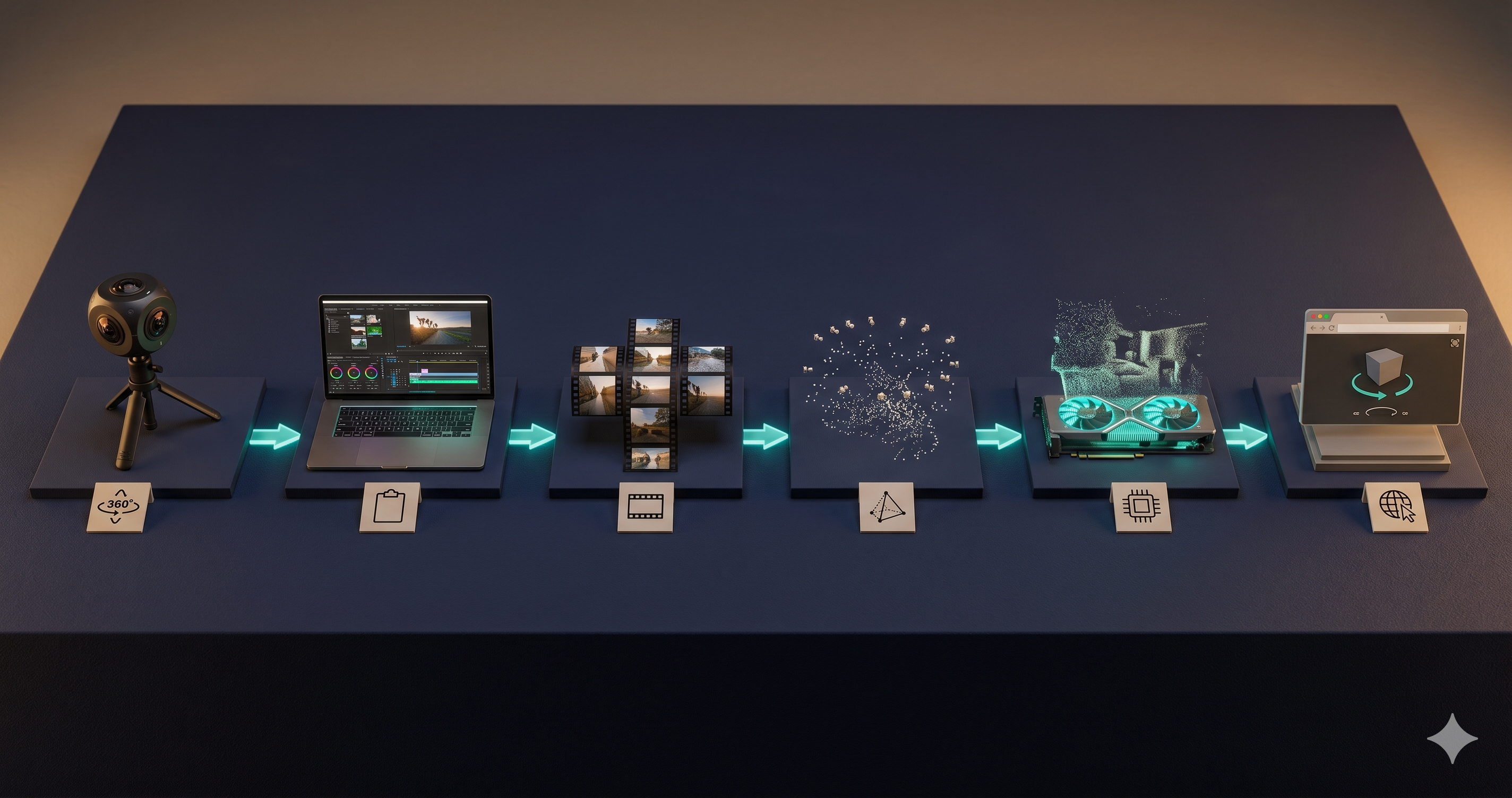
Two hours of wall-clock time. Outdoor shade. A consumer 360-degree camera held at the end of a painter's pole. Four walking orbits, about 70 seconds each. Some shell scripting in the middle. Then a 14 MB file you can fly through in a browser tab.
This is the rig we're going to put under every client deliverable that touches real estate, sports venues, industrial sites, and field operations. The post below is the first time we ran the full pipeline end to end. We're publishing the methodology because nothing we used is proprietary, the tools are all open source or free-tier, and the only secret was finding a parking lot with consistent shade.
What it looks like
A Gaussian splat is the new kind of 3D model that's been quietly eating the visual effects industry over the last two years. Unlike traditional 3D mesh — the kind you'd build in Blender, with triangles and textures — a splat is a cloud of millions of fuzzy 3D blobs, each with a position, color, shape, and view-dependent lighting. From any angle, the blobs render into something that looks like a high-resolution photograph of the real thing. It runs in real time on a phone. It opens in a browser. No app to install.
The technical name is 3D Gaussian Splatting (3DGS). The Stanford 3D vision lecture covers the math; the practical version is that splats are roughly 1,000 times faster to render than the previous-generation method (NeRF) at comparable quality. That's the unlock. It's why every reality-capture pipeline shifted to splats in 2025, and why production-grade splats made it onto a live network television broadcast this month — the 2026 PGA Championship aired live 4D Gaussian Splatting of golfer swings, processed by Gracia.ai from a 56-iPhone rig on private 5G.
We're not running 56 iPhones. We're running one Insta360 ONE RS on a stick. But the same pipeline that works at network television scale works at one-person scale — that's the other thing we wanted to prove.

The capture
Four sessions, about 70 to 80 seconds each, all in a single afternoon. Outdoor shade. The 360-degree camera at the end of a painter's pole, held at different heights through each orbit so the scan captures the truck from above the roofline, eye level, and below the rocker panels.
The first attempt failed. We tried it in a borrowed garage. The lighting was bad, the floor was too reflective, and the files didn't transfer cleanly off the camera. We wiped it, drove home, and shot again outside.
Things we learned in the failure that we did right the second time:
- Outdoor shade beats indoor anywhere. A garage adds two problems — uneven artificial lighting and a polished floor that confuses the math the pipeline uses to estimate camera positions. Open sky with the truck in shade gives consistent illumination on every panel without the reflection problem.
- Multiple heights matter. The first orbit was at chest height. We added a second at head height, then one above the roof using the pole at full extension, then one near the wheel wells. Each height adds a perspective the others miss.
- Walk, don't pivot. The pipeline needs the camera to see the truck from genuinely different positions, not just rotated in place. Walking a wide circle gives the geometry the parallax it needs to figure out where everything is in 3D space.
About five minutes of usable spherical footage total. Four MP4 files at 5888×2944 resolution, 120 megabits per second, totaling 4.1 GB on disk.
Step 1: Studio export
The Insta360 ships with a desktop app called Studio that stitches the dual-fisheye raw files into a single equirectangular video. There's a trap in the default settings.
The "Export as: Video" option produces a flat, reframed 1080p clip. That's wrong for our use case — it bakes a single viewing direction into the file and throws away the spherical data we just captured. The correct setting is "Export as: 360 Video", which preserves the full spherical projection in the file. Same camera, completely different output.
Twelve minutes of Studio export time gave us four equirectangular MP4 files at full resolution.
Step 2: Cube faces
A splat training pipeline doesn't want 360-degree video. It wants discrete frames from a normal camera, each at a known orientation. So the next step is to slice the equirectangular video into six "cube faces" per frame — front, back, left, right, up, and down — which is what most pipelines expect as input.
This is ffmpeg work. One filter chain decimates the video to one frame per second, and then a second filter (v360=e:c6x1) unwraps each spherical frame into six perspective images laid out in a horizontal strip, which then gets sliced into six individual files.
We hit a real bug here that's worth flagging because it took an hour to track down.
Our first run produced 1,764 cube-face JPGs at 1500×1500 pixels — the right count. But when we spot-checked them, the down, front, and back faces of frame 0001 were all identical files, byte-for-byte. The same for every frame in the run. We'd lost half our coverage.
The cause: our ffmpeg filter graph implicitly aliased its split outputs. When you reference the same named pad twice in a filter chain, ffmpeg lets you do it but produces undefined behavior — it had decided to feed the rightmost crop into the last three output streams. The fix was a single explicit filter: split=6 before the crops, forcing six distinct output streams the rest of the chain could consume independently. Re-run, verified by MD5 hashing the same frame across all six face files. All unique.
This kind of bug is the reason we test every pipeline end to end before claiming "done." Unit tests pass. The frame counts match. The file sizes look plausible. Only when you actually open the down-facing frame and recognize it as the front of the truck do you realize three of your six camera angles were silently lost. We wrote about this exact failure mode in the context of our own ADS-B WebSocket bug from a few weeks earlier — same pattern, different tool. We added a verification step to our internal hygiene rules because of it.
The corrected output: 1,764 cube-face images, 506 MB total, ready to feed to the splat trainer.
Step 3: Structure from Motion
The first piece of GPU work. Before a splat trainer can learn what the truck looks like in 3D, it needs to know where each of those 1,764 cameras was when it took the picture. The pipeline that figures this out is called Structure from Motion (SfM). We use RealityScan — Epic Games' free desktop app, descended from the old RealityCapture line.
You point it at the cube-face folder, choose "align images," and walk away. About 45 minutes later it reports back. Ours aligned 1,643 of the 1,764 images successfully — a 93.1% alignment rate, which is a strong number for outdoor consumer-camera input. The 121 it dropped are mostly down-facing frames where the gravel and asphalt didn't have enough visual texture for the pipeline to lock onto.
Output: a sparse point cloud (376,875 points) and a COLMAP-format export with each camera's estimated position and orientation in 3D space. The Cybertruck is now a constellation of points floating in a virtual scene, with 1,643 virtual camera positions arrayed around it.

Step 4: The actual splat
This is where the GPU does its real work. We use LichtFeld Studio — an open-source 3DGS training tool that runs natively on Windows with CUDA. The repo is maintained by Janusch Patas, who goes by MrNeRF on X and curates the canonical 3DGS paper list.
You give LichtFeld the point cloud and the camera positions from RealityScan, set the iteration count, and start training. It uses an optimization called MCMC (Markov Chain Monte Carlo) at default settings — every iteration, the trainer adjusts the millions of Gaussian blobs to better match the photographs from each camera's position. Wrong-colored blobs get re-colored. Mis-positioned blobs migrate. Over-sized blobs split into smaller ones; redundant blobs merge.
Thirty thousand iterations. About an hour of wall time on the GPU. Output: a 237 MB .ply file containing roughly 1.5 million Gaussian primitives.
About halfway through training, the Claude session we were running through crashed. The relay died, the terminal disconnected, the Claude window was unreachable. Our automation harness didn't know whether to retry or abort.
LichtFeld didn't care. It writes its training state to disk as it goes — checkpoint files, intermediate point clouds, log lines — so when we reattached two minutes later, the training was 18,000 iterations in and still running. We watched it finish. The lesson worth filing: prefer tools that write to disk as they work over tools that hold their work in process memory. When the orchestration layer is flaky, file-based tools survive. (We codified this lesson in our agent hygiene rules — verify end to end on the actual surface, not the orchestration layer's belief about the surface.)
Step 5: Compression and viewer
A 237 MB file is too big to embed on a web page. The final step compresses it to a format optimized for the browser.
We upload to SuperSplat, PlayCanvas's free editor and viewer for splat scenes. Drag in the .ply, and SuperSplat auto-converts to a format called SOG — Streamable Open Gaussian — which uses spherical harmonic compression to shrink the file 15× to 20× with negligible perceived quality loss. Our 237 MB .ply became a 13.88 MB SOG file. Same scene, web-deliverable size.
SuperSplat's viewer is what produces the actual playable result. Mouse-orbit, zoom, pan. The Cybertruck rotates in the browser. The angular hood, the A-pillar geometry, the windshield rake, the silhouette — all unmistakably the truck.
What's good, what's soft, what's next
Good:
- Outline geometry is clean. From any angle, it reads as a Cybertruck immediately.
- The truck holds its shape across the full orbit. No "exploded" panels, no missing chunks of body.
- 13.88 MB ships over mobile connections without stalling.
- We can hand this to anyone with a phone or laptop browser and they can navigate it.
Soft:
- Body panel sharpness suffers on the reflective stainless. First-pass 3DGS on view-dependent reflective surfaces is the hardest case, and ours shows it. Stainless picks up sky and surroundings differently from each angle, which is exactly the variable the splat model has to estimate. The fix is more iterations and more aggressive splat splitting — 100,000 iterations instead of 30,000 — at the cost of training time.
- Wheel detail is light. Small, black, reflective is the trifecta of hardest cases. A second iPhone close-up pass orbiting just the wheels would feed in dense wheel data.
- Background streakiness behind the truck. We sampled the input video at one frame per second; bumping to two frames per second on the next round will give the trainer more parallax on the trees and fence line.
Next:
- Generate the same scene with Postshot 1.1's photometric compensation — a feature released the same morning as the PGA Championship shoot, which reduces floaters specifically on reflective surfaces. We'll re-train Phase 1.5 with PPISP enabled and compare side by side.
- Add an AprilTag scale calibration pass to make the resulting splat dimensionally accurate to within a centimeter. A $50 paper tag in the frame, two seconds of post-processing math, and the truck stops being "a picture you can spin" and becomes "a measurement instrument."
- Add a voxel collision layer so the scene supports a walk-through avatar instead of just orbit. PlayCanvas ships this for free now; the collision data is around 400 KB on top of the 13.88 MB splat — under 3% overhead for a complete walkable scene.

Why we ran this
There are three kinds of deliverables this pipeline makes possible for our work, and one of them is the reason we wanted to validate the toolchain on something with our name on it before quoting a client.
The first is real estate. A listing with a navigable 3D walkthrough beats a listing with a photo gallery, every time. We have an archive of listings shot on a mix of 360-degree cameras, iPhones, and DSLRs already; the cybersplat pipeline above is what turns each of them into a superspl.at/scene/<id> link to drop on the listing page.
The second is sports venues and small-broadcast media. The PGA Championship work proves the production ceiling; what's interesting for our scale of work is the floor. Single-course flyovers, college tournaments, club marketing material — the parts of the market that can't write a quote for a 56-iPhone rig but can write one for our single-operator equivalent. We unpacked the positioning in a separate post on what golf broadcasts taught us.
The third is on-site engineering and inspection — industrial sites, infrastructure, manufactured items where a customer needs the visual fidelity of a photograph and the measurement accuracy of a survey. That's the AprilTag-calibrated metrology version, which is a separate post.
For all three, the question we wanted to answer was: how much of this pipeline can we run, end to end, on a Tuesday afternoon with consumer hardware? Answer: most of it. Outdoor shade, two hours, one operator. The Cybertruck is the proof.
Free pieces, where they came from
Almost the whole stack is free or open source. The exceptions are noted.
- Insta360 Studio — free, comes with the camera. Settings matter; the "360 Video" export option is the only one that preserves the spherical data.
- ffmpeg — open source, included on most systems. The
v360=e:c6x1filter is the workhorse. Usesplit=6to avoid the implicit aliasing bug. - RealityScan — Epic Games, free for evaluation use. Industrial-grade SfM, the same engine the visual effects industry uses for set scanning.
- LichtFeld Studio — open source (GitHub:
MrNeRF/LichtFeld-Studio). Native Windows binaries; Linux source builds also work. NVIDIA GPU required, 12 GB VRAM minimum for scenes this size. - SuperSplat — MIT-licensed, free. Hosted version at
supersplat.iofor upload-and-share; full editor source on GitHub from PlayCanvas.
The hardest part wasn't the software. It was the lighting decision and the parking lot.
We're going to spend the next few weeks turning this pipeline into shippable client deliverables. If you operate a property, a venue, a site, or a piece of physical equipment that would benefit from being a navigable web link instead of a folder of photographs, get in touch. We'd like to scan it.
Related reading:
- What Golf Broadcasts Just Taught Us About 3D Capture for Client Work — the production benchmark and the long-tail positioning
- AprilTag-Scaled Gaussian Splatting: Photo-Realistic 3D With Real-World Dimensions — the metrology layer that turns a viewer into a measurement instrument
- Walkable Splats: 418KB Makes Any 3DGS Scene a Video Game — the voxel collision layer that turns a viewer into a navigable environment
- Blue Octopus AI Hygiene: A Drop-in CLAUDE.md for Anyone Letting an Agent Touch Their Code — the verification-end-to-end rule the cube-face bug taught us
Keep reading
More from the field.
Stay Connected
Get practical insights on using AI and automation to grow your business. No fluff.